
Advanced Guide to caskade#
The beginners guide layed out the basics of constructing simulators in caskade, now we will present the powerful capabilities and techniques that let you easily and efficiently perform complex analyses. The order of these techniques has no particular meaning, so you may search for points of interest or scan through for relevant sections.
import torch
import numpy as np
import caskade as ck
from time import time, sleep
import matplotlib.pyplot as plt
import h5py
from IPython.display import display
Ways of accessing Param values#
When running a simulation there are several ways to access the value of a Param object, here is a mostly complete listing.
class TryParam(ck.Module):
    def __init__(self, submod):
        super().__init__()
        self.x = ck.Param("x", 1.0)
        self.y = ck.Param("y", 2.0)
        self.submod = submod

    @ck.forward
    def test_access(self, a, x, k=1, y=None):
        # Regular function attribute, is not a caskade object and so behaves normally
        total = a
        total += k

        # Getting values from Param objects
        total += x**2  # as arg of function (preferred)
        total += y**2  # as kwarg of function (preferred)
        total += self.x.value**2  # by attribute (allowed but discouraged)
        total += (
            self.submod.I0.value**2
        )  # by attribute of submod (allowed but may indicate inefficient code)

        # Modifying values of Param objects
        x = 3.0  # locally modify param value (allowed)
        total += x**2  # use modified value, will not change the param value globally
        total += self.submod.brightness(
            0, 0, sigma=2.0
        )  # call module with modified param value, only affects this call (allowed)
        self.x.value = 4.0  # modify param value globally (explicitly forbidden)
        return total


G = Gaussian("G", x0=5, y0=5, q=0.5, phi=0.0, sigma=1.0, I0=1.0)
T = TryParam(G)

try:
    T.test_access(0.0)
except ck.ActiveStateError as e:
    print("Caught ActiveStateError:", e)

# Outside a @forward function, we can still access param values like so:
print("x:", T.x.value)
# If a Param is a pointer, and you access the `value` it will try to evaluate the pointer
G.sigma = T.x
print("sigma:", G.sigma.value)  # Basic pointer to another Param
G.sigma = lambda p: p.x.value * 2.0
G.sigma.link(T.x)
print("sigma:", G.sigma.value)  # Function pointer
Caught ActiveStateError: Cannot set value of parameter x while active
x: tensor(1.)
sigma: tensor(1.)
sigma: tensor(2.)
Control dynamic vs static param#
One of the most powerful features of caskade is its flexible system for switching which parameters are dynamic (involved in sampling/fitting) and which are static (fixed). This allows a single simulator object to perform many tasks with a uniform interface. Here we will see a few options for controlling this feature.
# All params initialized with a value
G1 = Gaussian("G1", x0=5, y0=5, q=0.5, phi=0.0, sigma=1.0, I0=1.0)
G2 = Gaussian("G2", x0=5, y0=5, q=0.5, phi=0.0, sigma=1.0, I0=1.0)
C = Combined("C", G1, G2)
print("All params are static automatically when given a value")
display(C.graphviz())

# Set individual param to dynamic
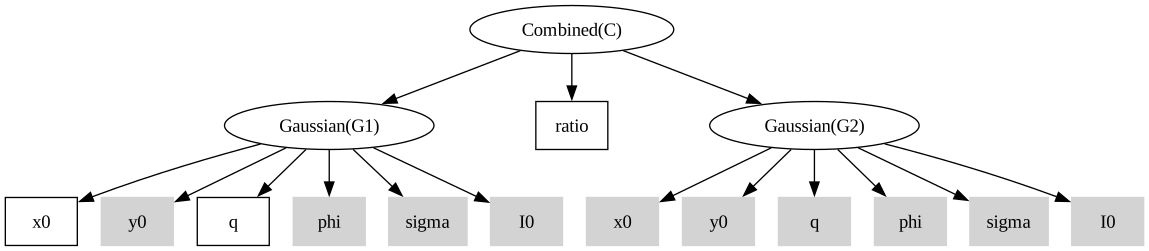
G1.x0.to_dynamic()  # call function to set dynamic
G1.q = None  # set to None to make fully dynamic
G1.q.to_dynamic(0.5)  # set with dynamic value
C.to_dynamic()  # only sets immediate children to dynamic
print("Individual params can be set to dynamic")
display(C.graphviz())

# Set all simulator params to be dynamic
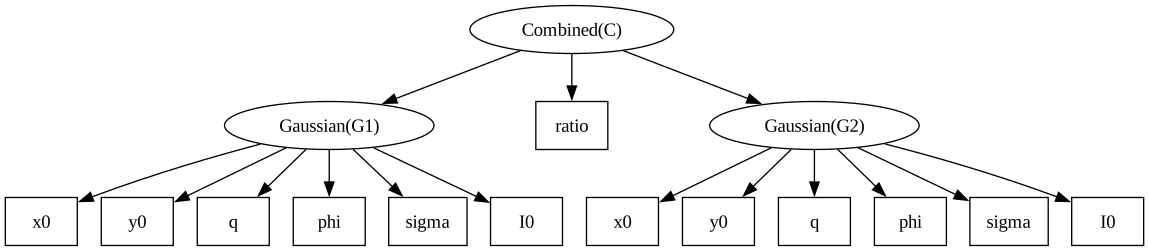
C.to_dynamic(children_only=False)
print("All params for the entire simulator may be set to dynamic")
display(C.graphviz())

# Even when set to dynamic, the params remember their original values
print("x0:", G1.x0.value)
G1.x0 = G1.x0.value  # Setting value sets to static
G1.q.to_static()  # Setting to static, uses the earlier value

# Setting a value and make it static
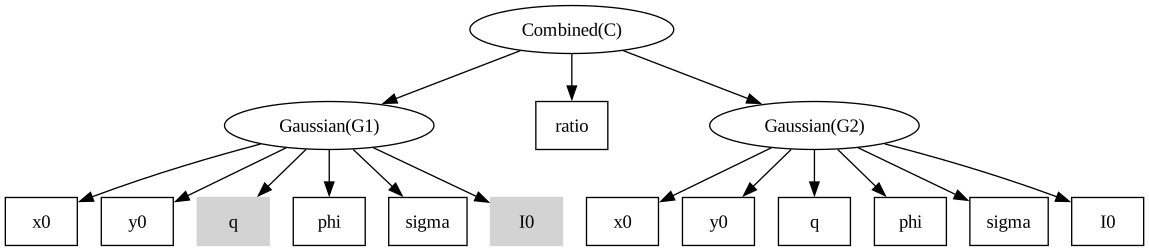
G1.I0.to_static(10.0)
print("Individual params can be set to static")
display(C.graphviz())

# Similarly a whole simulator can be set static
C.to_static(children_only=False)
print("All params for the entire simulator may be set to static")
display(C.graphviz())

# Use a param list to set multiple params to dynamic
paramset1 = ck.NodeList([G1.x0, G1.q, G2.phi, G2.sigma])
paramset1.to_dynamic()  # set all params in the list to dynamic
print("Use a NodeList to curate which params are set to dynamic/static")
display(C.graphviz())

# NOTE: trying to set a dynamic param to static when there is no stored value will throw an error
badparam = ck.Param("badparam")
print("Blank param is dynamic: ", badparam.dynamic)
try:
    badparam.to_static()
except Exception as e:
    print(f"Caught error: {type(e)}: {e}")
    print("Param is still dynamic: ", badparam.dynamic)
All params are static automatically when given a value
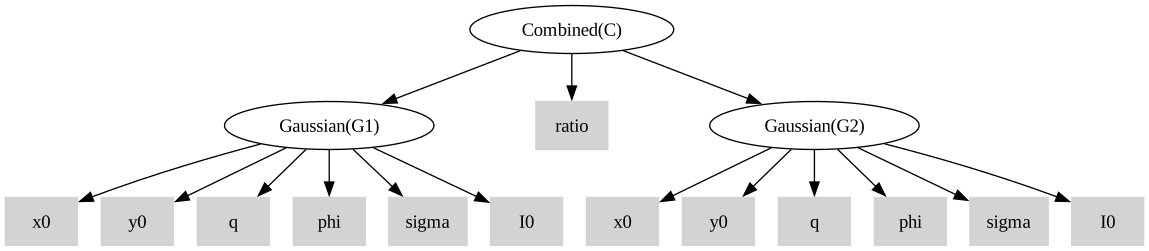
Individual params can be set to dynamic
All params for the entire simulator may be set to dynamic
x0: tensor(5)
Individual params can be set to static
All params for the entire simulator may be set to static
Use a NodeList to curate which params are set to dynamic/static
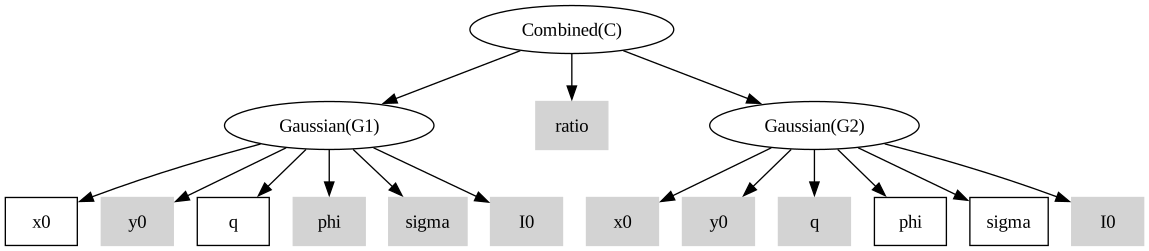
Blank param is dynamic: True
Set valid range for a parameter#
Not all parameters should be allowed to explore any real number in \((-\infty, \infty)\). So caskade provides a simple system to record and sometimes enforce the valid range for a given parameter. The valid range is simply a tuple of two values that tell caskade what values to expect for that parameter. If you provide param.valid = (0, None) then the value must be strictly greater than zero. If you provide param.valid = (None, 1) then the value must be strictly less than one. If you provide param.valid = (0, 1) then the value can be anything from zero to one (inclusive). If you set a param to be cyclic via param.cyclic = True then it must have a two sided valid range and in that case a value which passes outside the valid range is wrapped around via modulo arithmetic.
Note: Keep in mind that the one sided limits are exclusive (value cannot equal the boundary), while the two sided limits are inclusive (the value can equal the boundary values). This is for numerical stability reasons both in the forward calculations and in passing gradients. Internally, the one sided limits are enforced via a log/exp pair to transform between spaces, while the two sided limits are enforced via a gradient preserving value clip.
# Make basic gaussian model
G = Gaussian("G", x0=5, y0=5, q=0.5, phi=0.0, sigma=1.0, I0=1.0)

# Axis ratio (q) should be restricted to (0, 1), but the 0 boundary is unstable so we add an epsilon to the lower bound
G.q.valid = (1e-6, 1.0)

# Position angle (phi) should be restricted to (-pi, pi), and is cyclic
G.phi.valid = (-np.pi, np.pi)
G.phi.cyclic = True

# Standard deviation (sigma) should be strictly positive
G.sigma.valid = (0, None)

# Typically you actually set the valid range when making a parameter
p = ck.Param("p", 0.5, valid=(0, 1))
Lets see what happens when we set an invalid value for the axis ratio
G.q = -0.1  # Invalid, below lower bound, throws warning
print("q:", G.q.npvalue)
q: -0.1
/home/docs/checkouts/readthedocs.org/user_builds/caskade/envs/latest/lib/python3.13/site-packages/caskade/param.py:798: InvalidValueWarning:
Value -0.10000000149011612 for parameter "q" is outside the valid range (9.999999974752427e-07, 1.0).
Likely to cause errors or unexpected behavior!
  warn(InvalidValueWarning(self.name, value, self.valid))
Note that we were still allowed to set the invalid value, we were only given a warning. in this sense, caskade is quite permissive, but sometimes you will want to guarantee that values remain in a valid range regardless of what the user provides. That is a case for the ValidContext which intercepts value setting at the module level and ensures values remain in their valid range.
G.q = 0.5  # Back to valid value
G.q.to_dynamic()
G.sigma.to_dynamic()

print("Outside valid context, get_values: ", G.get_values("dict"))
with ck.ValidContext(G):
    # Inside valid context, get_values/set_values works a bit differently
    params = G.get_values("dict")
    print("In valid context, get_values: ", params)

    params["q"] = torch.tensor(-0.1)  # Change q to invalid value?
    params["sigma"] = torch.tensor(-1.0)  # Change sigma to invalid value?

    G.set_values(params)  # Set values, will compress to valid range
    print("After set_values, q:", G.q.npvalue, "sigma:", G.sigma.npvalue)
Outside valid context, get_values:  {'q': tensor(0.5000), 'sigma': tensor(1.)}
In valid context, get_values:  {'q': tensor(0.5000), 'sigma': tensor(0.)}
After set_values, q: 1e-06 sigma: 0.36787945
When we call Module.get_values() inside the ValidContext, the q value which has a double valid range is returned normally, but the sigma value is converted to log space (\(\log(1.0) = 0.0\)). When we call Module.set_values(params) with our updated parameters, the q value is clipped back to the valid range, while the sigma value is converted from log space to linear space (\(e^{-1.0} = 0.3678...\)).
The valid context can be super useful for sampling/optimization. If you use x0 = Module.get_values() inside a ValidContext then run a sampler/optimizer it will be able to start from x0 and explore the parameter space without needing to worry about accidentally falling out of the valid ranges and crashing your code.
Call function with internally modified param value#
A caskade simulator often is build of nested modules that call each others functions. Sometimes one may wish to call a function but with a different value for one of the Params than what has been given in the input (for example when computing a reference for comparison). Here we will show how to do this kind of local Param modification. This is also covered in Ways of accessing Param values.
class TryModify(ck.Module):
    def __init__(self, submod):
        super().__init__()
        self.submod = submod
        self.newval1 = torch.tensor(2.0)
        self.newval2 = torch.tensor(3.0)

    @ck.forward
    def test_modify(self):
        init = self.submod.brightness(0, 0)  # call with original param values
        mod = self.submod.brightness(0, 0, sigma=self.newval1)  # call with modified param value
        with ck.OverrideParam(self.submod.sigma, self.newval2):
            othermod = self.submod.brightness(0, 0)  # call with temporarily modified param value
        assert init != mod
        assert init != othermod
        assert mod != othermod
        print("See, they are all different!")
        return init, mod, othermod


G = Gaussian("G", x0=5, y0=5, q=0.5, phi=0.0, sigma=1.0, I0=1.0)
T = TryModify(G)
print(T.test_modify())
See, they are all different!
(tensor(2.6810e-14), tensor(0.0004), tensor(0.0310))
Reparametrize a Module#
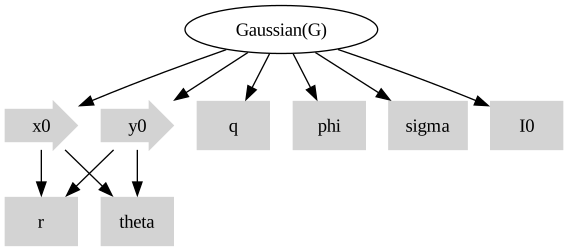
Sometimes it makes sense to write a module and its functions using a particular parametrization, but on some occasions or for user interpretation it should be given in another parametrization. For example, it may be easier to write some model in cartesian coordinates, but for users the polar coordinates are easier to interpret.
G = Gaussian("G", x0=5, y0=5, q=0.5, phi=0.0, sigma=1.0, I0=1.0)  # default in cartesian coordinates
r = ck.Param("r", 1.0)  # radius
theta = ck.Param("theta", 0.0)  # angle
G.x0 = lambda p: p.r.value * torch.cos(p.theta.value)
G.x0.link([r, theta])
G.y0 = lambda p: p.r.value * torch.sin(p.theta.value)
G.y0.link([r, theta])

G.graphviz()
Save, Append, and Load the Param values#
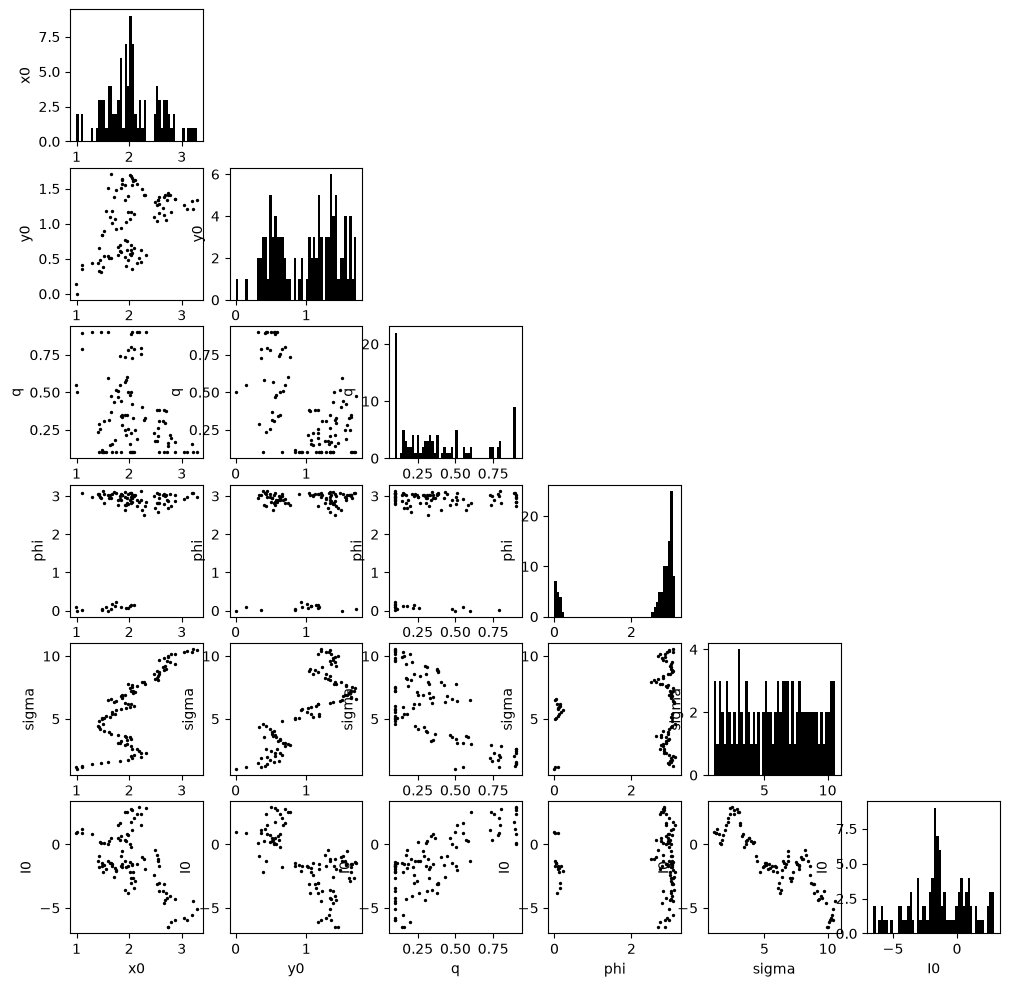
It is possible to save the state of the params in a caskade simulator in an HDF5 file. Once saved, one can append to the file to create a “chain” such as in MCMC sampling.
Note: it is also possible to store other data in the hdf5 file. Simply add the relevant attribute to the saveattr set of any of the caskade nodes and it will be stored at the appropriate place in the graph. This would be redundant, but for example you could do Node.saveattr.add('name') and the Node.name will get stored in the HDF5 file. The Node.name attribute would also then get overwritten if you load the state (though in this case it would overwrite to the same value).
# Recreate the gaussian in polar coordinates example
G = Gaussian("G", x0=5, y0=5, q=0.5, phi=0.0, sigma=1.0, I0=1.0)
G.test_save = torch.tensor([1.0, 2.0, 3.0])
G.saveattrs.add("test_save")
r = ck.Param("r", 1.0)
theta = ck.Param("theta", 0.0)
G.x0 = lambda p: p.r.value * torch.cos(p.theta.value)
G.x0.link([r, theta])
G.y0 = lambda p: p.r.value * torch.sin(p.theta.value)
G.y0.link([r, theta])

# Run the "MCMC"
G.save_state("gauss_chain.h5", appendable=True)  # save the initial state

# Pretend to run a sampling chain
for _ in range(100):
    G.x0.value += np.random.normal(0.01, 0.1)
    G.y0.value += np.random.normal(0.01, 0.1)
    G.q.value = np.clip(G.q.value + 0.1 * np.random.randn(), 0.1, 0.9)
    G.phi.value = (G.phi.value + 0.1 * np.random.randn()) % np.pi
    G.sigma.value += np.random.normal(0.1, 0.05)
    G.I0.value += np.random.normal(0.01, 0.5)

    G.append_state("gauss_chain.h5")  # append the new state
Check value of test_save: [1. 2. 3.]
You can also simply load the state of a module from the hdf5 file.
G.load_state("gauss_chain.h5", 32)  # Load the 32nd state from the chain

print("Loaded state 32:")
print(f"x0: {G.x0.value.item():.2f}")
print(f"y0: {G.y0.value.item():.2f}")
print(f"q: {G.q.value.item():.2f}")
print(f"phi: {G.phi.value.item():.2f}")
print(f"sigma: {G.sigma.value.item():.2f}")
print(f"I0: {G.I0.value.item():.2f}")
Loaded state 32:
x0: 3.21
y0: 1.21
q: 0.31
phi: 2.83
sigma: 4.06
I0: 0.09
Add meta data to a Param or Module#
Sometimes it is very useful to carry along some extra data right next to your params. For example, you may want to keep track of the uncertainty of a param value. Since params and modules are objects, you can add attributes how you like! Just don’t override an existing attribute or you might cause chaos.
p = ck.Param("p", 1.0)

p.extra_info = 42
It is also possible to define new types of Param objects by subclassing Param, however one should be careful not to make differences too extreme if they wish to interact with other caskade based packages. A straightforward example would be when making a package where every parameter will store an uncertainty, rather than creating the attribute for each new Param, one can just make a class that starts with it from the outset.
class ParamU(ck.Param):
    def __init__(self, *args, uncertainty=None, **kwargs):
        super().__init__(*args, **kwargs)
        if uncertainty is None:
            self.uncertainty = torch.zeros_like(self.value)
        else:
            self.uncertainty = uncertainty


p = ParamU("p", 1.0)
print(f"p: {p.value} +- {p.uncertainty}")
p2 = ParamU("p2", 2.0, uncertainty=0.1)
print(f"p2: {p2.value} +- {p2.uncertainty}")
p: 1.0 +- 0.0
p2: 2.0 +- 0.1
Break up a Param Tensor#
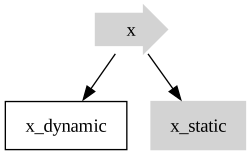
Sometimes a Param value is naturally a multi-component tensor, but we only wish for part of it to be dynamic. This can be accomplished by creating new params and linking appropriately.
# This is the param we plan to use
x = ck.Param("x", torch.arange(10))  # param has 10 elements
print("Original x tensor", x.value)

# These are sub params for the broken primary param
x_dynamic = ck.Param("x_dynamic", torch.arange(3))  # want first three elements to be dynamic
x_dynamic.to_dynamic()
x_static = ck.Param("x_static", torch.arange(3, 10))  # want last seven elements to be static

# This rebuilds the full param from the broken params
x.value = lambda p: torch.cat((p.x_dynamic.value, p.x_static.value))
x.link(x_dynamic)
x.link(x_static)

# Here we see we get the same result, but now only the first three elements are dynamic!
print("Rebuilt x tensor", x.value)
x.graphviz()
Original x tensor tensor([0, 1, 2, 3, 4, 5, 6, 7, 8, 9])
Rebuilt x tensor tensor([0, 1, 2, 3, 4, 5, 6, 7, 8, 9])
Batching with caskade#
Adding batch dimensions allows for more efficient computation by requiring less communication between the CPU and GPU, or simply by letting the CPU spend more time doing computations and less time reading python code. In caskade it is possible to fully take advantage of batching capabilities of ones code. Here we demo the basic format for doing so.
Case 1, vmap#
vmap is a utility in PyTorch that lets you automatically add a batch dimension to your inputs and outputs. You can think of it like a faster version of a for-loop that just stacks all the outputs together.
caskade will create a batched version of params for you if a param is set with aa value that has extra dimensions beyond the intended shape of the param.
G = Gaussian("G", x0=5, y0=5, q=0.5, phi=0.0, sigma=1.0, I0=1.0)
G.sigma.to_dynamic()
G.phi.to_dynamic()
x, y = torch.meshgrid(torch.linspace(0, 10, 100), torch.linspace(0, 10, 100), indexing="ij")

# Batching using vmap                phi                            sigma
# Manually build the params
params = torch.stack((torch.linspace(0.0, 3.14 / 2, 5), torch.linspace(0.5, 4.0, 5)), dim=-1)
print(params.shape)
img = torch.vmap(G.brightness, in_dims=(None, None, 0), out_dims=0)(x, y, params)
fig, axarr = plt.subplots(1, 5, figsize=(20, 4))
for i, ax in enumerate(axarr):
    ax.imshow(img[i].detach().numpy(), origin="lower")
    ax.axis("off")
plt.show()

# Batching using vmap, caskade can build the params
G.phi = np.linspace(0, 3.14 / 2, 5)
G.sigma = np.linspace(0.5, 4, 5)
params = G.get_values()  # caskade realizes at least some params are batched
print(params.shape)
img = torch.vmap(G.brightness, in_dims=(None, None, 0), out_dims=0)(x, y, params)
fig, axarr = plt.subplots(1, 5, figsize=(20, 4))
for i, ax in enumerate(axarr):
    ax.imshow(img[i].detach().numpy(), origin="lower")
    ax.axis("off")
plt.show()


# Multiple batching with vmap
# imagine the brightness function could only take a single value, rather than a grid
#                                            batch x y                        batch params
img = torch.vmap(torch.vmap(G.brightness, in_dims=(0, 0, None)), in_dims=(None, None, 0))(
    x.flatten(), y.flatten(), params
)
img = img.reshape(5, *x.shape)
fig, axarr = plt.subplots(1, 5, figsize=(20, 4))
for i, ax in enumerate(axarr):
    ax.imshow(img[i].detach().numpy(), origin="lower")
    ax.axis("off")
plt.show()
torch.Size([5, 2])

torch.Size([5, 2])
Case 2, Module with batch dimension#
If you write a module assuming the user will pass parameters with a batch dimension, then you can handle direct batching without using wrappers like vmap. This requires a bit more care in managing the shapes of each object, but can pay off a somewhat in terms of speed later on. Since caskade has hierarchical models as an option (see hierarchical models tutorial), we generally recommend making the modules in whatever way is most intuitive for you and then building the simulator appropriately. For large packages like caustics it is advantageous not to make modules with batch dimensions, since it adds unnecessary clutter.
class GaussianBatched(ck.Module):
    def __init__(self, name, x0=None, y0=None, q=None, phi=None, sigma=None, I0=None):
        super().__init__(name)
        self.x0 = ck.Param("x0", x0)  # position
        self.y0 = ck.Param("y0", y0)
        self.q = ck.Param("q", q)  # axis ratio
        self.phi = ck.Param("phi", phi)  # orientation
        self.sigma = ck.Param("sigma", sigma)  # width
        self.I0 = ck.Param("I0", I0)  # intensity

    @ck.forward
    def _r(self, x, y, x0=None, y0=None, q=None, phi=None):
        x0 = x0.unsqueeze(-1)
        y0 = y0.unsqueeze(-1)
        q = q.unsqueeze(-1)
        phi = phi.unsqueeze(-1)
        x, y = x - x0, y - y0
        s, c = torch.sin(phi), torch.cos(phi)
        x, y = c * x - s * y, s * x + c * y
        return (x**2 + (y * q) ** 2).sqrt()

    @ck.forward
    def brightness(self, x, y, sigma=None, I0=None):
        init_shape = x.shape
        B, *_ = sigma.shape
        x = x.flatten()
        y = y.flatten()
        return (I0.unsqueeze(-1) * (-self._r(x, y) ** 2 / sigma.unsqueeze(-1) ** 2).exp()).reshape(
            B, *init_shape
        )


G = GaussianBatched("G", x0=[5], y0=[5], q=[0.5], phi=[0.0], sigma=[1.0], I0=[1.0])
G.to_dynamic()  # all params are dynamic
x, y = torch.meshgrid(torch.linspace(0, 10, 100), torch.linspace(0, 10, 100), indexing="ij")

# Batching on all dims using batched tensor input
params = G.get_values()
params = params.repeat(5, 1)  # 5 copies of the same params
params[:, 3] = torch.linspace(0.0, 3.14 / 2, 5)  # phi
params[:, 4] = torch.linspace(0.5, 4.0, 5)  # sigma
img = G.brightness(x, y, params=params)
fig, axarr = plt.subplots(1, 5, figsize=(20, 4))
for i, ax in enumerate(axarr):
    ax.imshow(img[i].detach().numpy(), origin="lower")
    ax.axis("off")
plt.show()

# Batching by setting shapes of params, then flat tensor input
for param in G.dynamic_params:
    param.value = None
    param.shape = (5,) + param.shape  # add batch dimension to shape
params = params.T.flatten()  # now params is a flat tensor again
img = G.brightness(x, y, params=params)
fig, axarr = plt.subplots(1, 5, figsize=(20, 4))
for i, ax in enumerate(axarr):
    ax.imshow(img[i].detach().numpy(), origin="lower")
    ax.axis("off")
plt.show()

# Batching using list input, note that list allows for different shapes, (also true for dictionary params)
params = [
    torch.tensor(5),  # x0
    torch.tensor(5),  # y0
    torch.tensor(0.5),  # q
    torch.linspace(0.0, 3.14 / 2, 5),  # phi, batched
    torch.linspace(0.5, 4.0, 5),  # sigma, batched
    torch.tensor(1.0),  # I0
]
img = G.brightness(x, y, params=params)
fig, axarr = plt.subplots(1, 5, figsize=(20, 4))
for i, ax in enumerate(axarr):
    ax.imshow(img[i].detach().numpy(), origin="lower")
    ax.axis("off")
plt.show()
Param shape with None#
Sometimes we know that a Param ought to have a particular number of dimensions, but we don’t know ahead of time what size they will be. For example a Param may represent a 2D image, but of any size. We can enforce this by setting the Param shape to (None, None). Now when we set a value for this param, it will need to conform to that expectation. A scalar value will raise an error, and a 3D value will be assumed to be batched. Here is a basic example:
p = ck.Param("image", shape=(None, None))
print("Not very interesting, just returns exactly what we set: ", p.shape)
try:
    p.value = 5
except Exception as e:
    print("Got an error: ", e)

p.value = np.ones((10, 15))
print("Now p shape reflects the value that was set: ", p.shape)

p.value = np.ones((5, 20, 25))
print("Now p shape reflects the appropriate 2 dimensions:", p.shape)
print("And the extra dimension is assumed to be a batch dimension: ", p.batch_shape)
Not very interesting, just returns exactly what we set:  (None, None)
Got an error:  Value shape torch.Size([]) does not match param shape (None, None)! Cannot update value. (image)
Now p shape reflects the value that was set:  (10, 15)
Now p shape reflects the appropriate 2 dimensions: (20, 25)
And the extra dimension is assumed to be a batch dimension:  (5,)
Note that the None must be in a tuple for it to work this way. So param.shape = None means no defined shape, it will just take the shape of param.value.shape; a 1D vector of unspecified length must be written as param.shape = (None,). You may also mix and match, so param.shape = (None, 2) would be an unspecified number of size 2 vectors, for example.
Param groups#
The core objective of caskade is to handle parameters of a simulator for you to create functions of the form f(x). However, sometimes this is a bit restrictive and it is helpful to build functions of a more general f(x,y,z,...) form.
A simple example is a simulator that one intends to vmap over a batch dimension for, but it has some static parameters that we would also like to have batched. In such a case we must make them dynamic parameters in order to pass at call time, but now there are mixed parameters that we would really like to keep separate.
Another example could be a case where we wish to perform an extra heavy calculation (such as a Jacobian or Hessian) and must be very selective of which parameters are to be included. This can often be handled by switching parameters between dynamic/static, but becomes more challenging if mixing these operations with vmap or with each other.
This is where parameter groups come into play. By default all params are in group 0, we can change this to any other integer and then the params object will become a tuple over the groups. Here is an example of what that looks like.
Gg = Gaussian(  # Bunch of batched params
    "Gg",
    x0=np.linspace(-1, 1, 5),
    y0=0.0,
    q=np.linspace(0.3, 0.9, 5),
    phi=np.linspace(0, 3, 5),
    sigma=np.linspace(0.1, 5, 5),  # Wish to make fixed sigma spacing
    I0=1.0,
)
Gg.to_dynamic()
Gg.sigma.group = 1  # Now sigma will be separate from the rest of the params
Gg.y0.to_static()  # set fixed params to static
Gg.I0.to_static()
params = Gg.get_values()
print(
    "params from get_values(), n groups:",
    len(params),
    ", size of first group:",
    params[0].shape,
    ", size of second group:",
    params[1].shape,
)
gradients = torch.vmap(
    torch.func.grad(lambda *a: Gg.brightness(a[0], a[1], (a[2], a[3])).sum(), argnums=2),
    in_dims=(None, None, 0, 0),
)(x, y, *params)
print("gradient shape:", gradients.shape)
params from get_values(), n groups: 2 , size of first group: torch.Size([5, 3]) , size of second group: torch.Size([5, 1])
gradient shape: torch.Size([5, 3])
The gradients variable now has the shape (5, 3) since it represents a batch of 5 gradient calculations on the 3 parameters which we wish to get gradient information for. One can now perform optimization etc on the first group of params while simply keeping the second group unchanged.
Note that the groups will automatically order themselves by sorting the group integers, so you can easily pick where each group goes in the params. You can even place groups ahead of group 0 by using negative integers.
Node Collections: NodeList, NodeTuple, and NodeDict#
Sometimes you want to group a subset of nodes together without wrapping them inside a new Module. caskade provides three lightweight collection types for this purpose:
NodeList– a mutable, ordered list of nodes (supportsappend,insert,pop, etc.)NodeTuple– an immutable, ordered tuple of nodesNodeDict– a mutable mapping ofstr → node, with attribute-style access
All three behave like their built-in Python counterparts while also being Node objects themselves, so they participate fully in the caskade graph.
When you assign a plain Python list, tuple, or dict of nodes as an attribute of a Module, caskade automatically converts it to the appropriate collection type:
self.my_params = [p1, p2, p3]         # becomes NodeList
self.my_params = (p1, p2, p3)         # becomes NodeTuple
self.my_params = {'a': p1, 'b': p2}   # becomes NodeDict
This means you never have to construct NodeList / NodeTuple / NodeDict explicitly inside a Module — just assign the plain collection and caskade handles the rest.
Use cases#
Gibbs-style sampling – keep one
NodeListof the parameters you currently want to sample (dynamic) and another for the parameters you want to hold fixed (static). Calling.to_dynamic()/.to_static()on the collection flips the whole subset at once.Selective saving / updating – build a
NodeDictof the parameters you care about and callget_values()/set_values()on just that subset, without touching the rest of the graph.Quick inspection – group modules or params of interest into a collection and iterate over them for printing, plotting, or diagnostics without restructuring the model.
Note that set_values and get_values also work on Node collections.
# Collections can be constructed directly
G = Gaussian("G", x0=5, y0=5, q=0.5, phi=0.0, sigma=1.0, I0=1.0)

# NodeList: mutable, ordered
position_params = ck.NodeList([G.x0, G.y0])
print("NodeList:", position_params)

# NodeTuple: immutable, ordered
shape_params = ck.NodeTuple((G.q, G.phi, G.sigma))
print("NodeTuple:", shape_params)

# NodeDict: mutable, keyed
named_params = ck.NodeDict({"x0": G.x0, "y0": G.y0, "sigma": G.sigma})
print("NodeDict:", named_params)
print("Attribute access:", named_params["x0"])  # same as named_params.x0
NodeList: NodeList|nlist
    x0|static: 5
    y0|static: 5
NodeTuple: NodeTuple|ntuple
    q|static: 0.5
    phi|static: 0
    sigma|static: 1
NodeDict: NodeDict|ndict
    x0|static: 5
    y0|static: 5
    sigma|static: 1
Attribute access: x0|static: 5
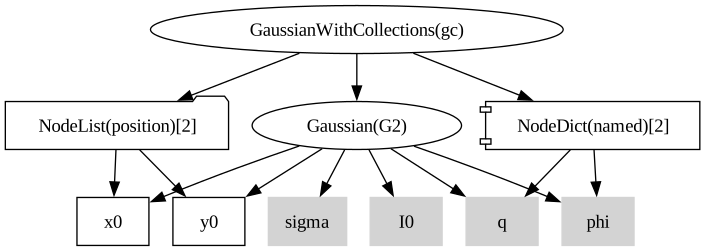
# Auto-conversion when assigned to a Module attribute
class GaussianWithCollections(ck.Module):
    def __init__(self, name, submod):
        super().__init__(name)
        self.g = submod
        # plain list/dict – caskade converts them automatically
        self.position = [submod.x0, submod.y0]  # -> NodeList
        self.named = {"q": submod.q, "phi": submod.phi}  # -> NodeDict

    @ck.forward
    def __call__(self, x, y):
        return self.g(x, y)


G2 = Gaussian("G2", x0=5, y0=5, q=0.5, phi=0.0, sigma=1.0, I0=1.0)
gc = GaussianWithCollections("gc", G2)
print(type(gc.position))  # NodeList
print(type(gc.named))  # NodeDict
gc.position.to_dynamic()  # can call collection methods
display(gc.graphviz())
<class 'caskade.collection.NodeList'>
<class 'caskade.collection.NodeDict'>
Remove Param from a Module#
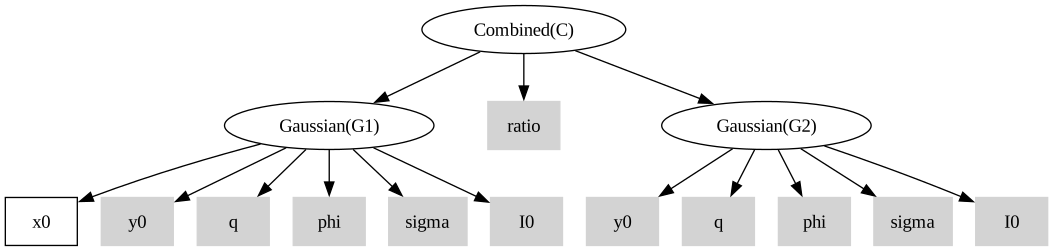
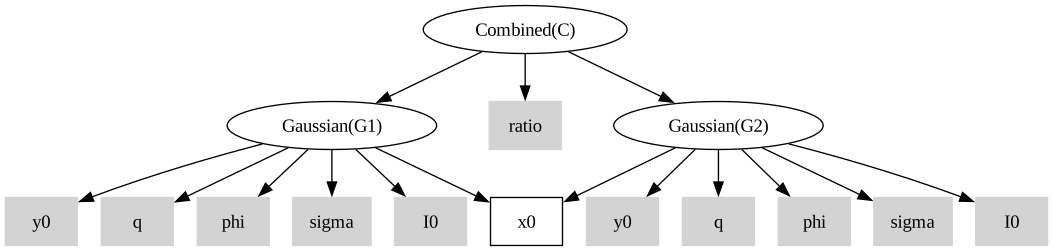
It is possible to remove a Param object from a module and later replace it. This may be helpful for getting a simulator exactly the way you want it. You may use this to have multiple modules share a Param rather than just pointing to the same object. Generally, this is not preferred practice since it is just as fast to use pointers and they are more flexible.
G1 = Gaussian("G1", x0=None, y0=5, q=0.5, phi=0.0, sigma=1.0, I0=1.0)
G2 = Gaussian("G2", x0=5, y0=5, q=0.5, phi=0.0, sigma=1.0, I0=1.0)
C = Combined("C", G1, G2)

del G2.x0  # remove a param from a module

C.graphviz()
G2.x0 = G1.x0  # assign a param from one module to another
C.graphviz()
Pointer functions only called once#
When you create a pointer function it may be arbitrarily complex, which may require a lot of compute. To maintain efficiency, the pointer is only called once for a given simulation then the value is stored. This shouldn’t matter on the user side, but it is just good to know!
class TryCallPointer(ck.Module):
    def __init__(self):
        super().__init__()
        self.x = ck.Param("x", 1.0)
        self.y = ck.Param("y", 2.0)

    @ck.forward
    def test_call(self):
        total = 0.0
        start = time()
        total += self.x.value
        print(f"first call took {time()-start:.5f} sec")
        start = time()
        total += self.x.value
        print(f"second call took {time()-start:.5f} sec")
        return total


def long_function(p):
    sleep(2)
    return 1.0 + p.y.value


T = TryCallPointer()
T.x = long_function
T.x.link(T.y)
print(T.test_call())

print("\nOutside @forward the pointer is called every time:")
start = time()
T.x.value
print(f"first outside call took {time()-start:.5f} sec")
start = time()
T.x.value
print(f"second outside call took {time()-start:.5f} sec")
first call took 2.00030 sec
second call took 0.00037 sec
tensor(6.)

Outside @forward the pointer is called every time:
first outside call took 2.00040 sec
second outside call took 2.00027 sec
active_cache methods called only once#
A lot of the way caskade is designed is for simulations that compute everything “fresh” because you don’t know which params will be dynamic ahead of time. However, sometimes there are very expensive calculations that you would really like to only do once, to “pre-compute” them, and then use for future simulations. The active_cache is halfway to that solution and can be very powerful. You can decorate a Module method with @active_cache so that an expensive function only gets called once per simulation. The result will still need to be re-computed for each simulation, but it will only be called once and so this should be good for most cases while avoiding potential pitfalls (e.g. failing to update the pre-computed values when they should).
WARNING: The cached method will only be called once per simulation, even if you give it different arguments! This can cause unexpected behaviour so use with caution
class DemoCache(ck.Module):
    def __init__(self):
        super().__init__()
        self.x = ck.Param("x", 1.0)

    @ck.active_cache
    def expensive_function(self, a):
        print("Computing `expensive_function`...")
        return 2 * a

    @ck.active_cache
    @ck.forward
    def compute_once(self, a, x):
        res = self.expensive_function(a)
        print("Computing 'compute_once'...")
        return res + x

    @ck.forward
    def main_sim(self):
        # First call of `expensive_function`
        exp = self.expensive_function(1.0)
        # First call of `compute_once`, computes the result, but reuses cached `expensive_function` result
        res = self.compute_once(2.0)
        # Second call, ignores the `3.0` argument, returns cached result
        res2 = self.compute_once(3.0)
        print(f"Result of first call: {res}, Result of second call: {res2}")
        return res, res2


demo = DemoCache()
print("Going to run expensive_function twice:")
print(demo.expensive_function(2.0))
# Outside of a @forward function, the cache does not apply, so it will compute again
print(demo.expensive_function(3.0))
print("\nGoing to run main_sim, which calls compute_once twice:")
demo.main_sim()
Going to run expensive_function twice:
Computing `expensive_function`...
4.0
Computing `expensive_function`...
6.0

Going to run main_sim, which calls compute_once twice:
Computing `expensive_function`...
Computing 'compute_once'...
Result of first call: 3.0, Result of second call: 3.0
(tensor(3.), tensor(3.))
Live param set during simulation#
Sometimes you won’t know the value of a param until the simulation is partway
through running. Often, this can be handled by a pointer parameter, but
sometimes more heavy lifting is needed or some other factor makes this a clumsy
solution. In these cases you can create a “live param” whose value is set during
the simulation. To do this, make a static param and set its value to None. Now
you can set the param during runtime of the simulation! This works by setting
the value or by calling a function with the value given just like regular param
override.
class ExampleLiveParam(ck.Module):
    def __init__(self):
        super().__init__()
        self.static_param = ck.Param("static_param", None, dynamic=False)

    @ck.forward
    def big_function(self):
        self.static_param = torch.tensor(42.0)  # set static param live in simulation

    @ck.forward
    def downstream_function(self, static_param):
        return static_param * 2

    @ck.forward
    def run_simulation(self):
        value1 = self.static_param.value
        # Set live value
        self.big_function()
        # Use live value
        value2 = self.downstream_function()
        # Use vmap over live value
        value3 = torch.vmap(lambda sp: self.downstream_function(static_param=sp))(
            torch.tensor([1.0, 2.0, 3.0])
        )
        return value1, value2, value3


E = ExampleLiveParam()
val1, val2, val3 = E.run_simulation()
print("Value from initial static param (should be None):", val1)
print("Value from live static param:", val2.item())
print("Values from vmap over live static param:", val3.tolist())
print("Outside simulation, static param is still None:", E.static_param.value)
Value from initial static param (should be None): None
Value from live static param: 84.0
Values from vmap over live static param: [2.0, 4.0, 6.0]
Outside simulation, static param is still None: None